SD5913 / WEEK 08 / 29 OCTOBER 2026
Build together.
Ship something.
Teamwork, cloud environments, delivery and computer vision.
SD5913 / WEEK 08 / 29 OCTOBER 2026
Build together.
Ship something.
Teamwork, cloud environments, delivery and computer vision.
OPENING / YOUR GROUP PROJECT
What is your group idea becoming?
A
A game
B
An app or creative tool
C
An installation
D
Something else / still deciding
SD5913 / WEEK 08 / 29 OCTOBER 2026
02

SD5913 / WEEK 08 / 29 OCTOBER 2026
Today
01
Project, assessment and news
02
Agile, Scrum and GitHub tracking
03
Git workflow + Codex environments
04
10-minute break
05
Actions, builds and deployment secrets
06
Live camera: OpenCV + MediaPipe
07
PFAD: the two-hour tutorial
SD5913 / WEEK 08 / 29 OCTOBER 2026
03
NEWS / 28 OCTOBER
Who gets to build and remix?
Switch 2: new access enables homebrew and mods.
Indie games: fear of AI clones delays a demo.
Agent research: automated monitors can be bypassed.
OpenAI announcement: test what coding agents produce.
SD5913 / WEEK 08 / 29 OCTOBER 2026
04
NEWS / 28 OCTOBER / VOICE
Dessa can listen while it speaks.
Dessa / Block: a research preview of speech-to-speech AI.
Full duplex: it listens and speaks at the same time.
Tone, timing, laughter and interruptions shape the conversation.
Your game: what changes if a character can hear you mid-sentence?
SD5913 / WEEK 08 / 29 OCTOBER 2026
05
01
Your group project
An ambitious idea, built and delivered together.
SD5913 / WEEK 08 / 29 OCTOBER 2026
06
GROUP PROJECT / CANVAS
Register your repository now.
1
Join sd5913; create one public repository for your team.
2
Submit its URL on Canvas; an initial README is enough.
3
Keep building and documenting progress in that repository.
Sunday 6 December 2026, 23:59 HKT
SD5913 / WEEK 08 / 29 OCTOBER 2026
07
GROUP PROJECT / 40% OF COURSE GRADE
How the project is marked
25%
Creative idea
Novelty
and value
50%
Code
Works, meets the brief
and handles complexity
25%
Execution
Steady work;
weekly progress
These are shares of the group-project mark.
SD5913 / WEEK 08 / 29 OCTOBER 2026
08
PROJECT / FIRST AGREEMENT
Make the next step testable.
Who uses it, and what do they do?
What visible or audible response makes the idea special?
What is the smallest working interaction your team can test?
Agree the scope together; credit code, assets and tools.
SD5913 / WEEK 08 / 29 OCTOBER 2026
09
02
Work as a team
Plan together. Build, review and adapt.
SD5913 / WEEK 08 / 29 OCTOBER 2026
10
AGILE / SCRUM / TOOLS
Three different kinds of support
Agile: values and principles for adaptive software development.
Scrum: a framework for learning and delivering value in Sprints.
GitHub Projects: a tool to track issues, ownership and progress.
Use them to organise the next playable or usable part of your project.
SD5913 / WEEK 08 / 29 OCTOBER 2026
11
AGILE / WEEK 1 REVISITED / 2001
The Agile Manifesto: four values
Individuals and interactions
over
processes and tools
Working software
over
comprehensive documentation
Customer collaboration
over
contract negotiation
Responding to change
over
following a plan
Both sides have value; the items on the left are valued more.
SD5913 / WEEK 08 / 29 OCTOBER 2026
12
AGILE / ITERATIVE + INCREMENTAL
Deliver, learn, adapt.
Iterative: improve with feedback. Incremental: add usable pieces.
Plan
Choose a goal
→
Build + test
Make it usable
→
Review
Inspect the result
→
Adapt
Update the plan
↑
Feedback informs the next plan
Transparency → Inspection → Adaptation
SD5913 / WEEK 08 / 29 OCTOBER 2026
13
SCRUM / THREE ACCOUNTABILITIES
Who is accountable?
Product Owner
Maximise value
Order the backlog
Developers
Plan, build and test
Create a usable Increment
Scrum Master
Help the team improve
Address impediments
One team shares responsibility for a useful result.
SD5913 / WEEK 08 / 29 OCTOBER 2026
14
SCRUM / ARTIFACTS + COMMITMENTS
From a goal to a usable Increment
Artifact
What it contains
Commitment
Product Backlog
Ordered work to
improve the product
Product Goal
Sprint Backlog
Goal + selected work
+ delivery plan
Sprint Goal
Increment
Usable, integrated,
verified work
Definition of Done
SD5913 / WEEK 08 / 29 OCTOBER 2026
15
SCRUM / THE SPRINT + FOUR EVENTS
A Sprint contains the learning cycle.
SPRINT / fixed length / one month or less
Planning
Agree a goal;
select work
→
Daily Scrum
15 min daily
Inspect + adapt
→
Review
Inspect result
with stakeholders
→
Retrospective
Improve quality
and teamwork
Review the product. Reflect on the process. Adapt the next Sprint.
SD5913 / WEEK 08 / 29 OCTOBER 2026
16
GITHUB PROJECTS / ILLUSTRATIVE BOARD
Make the work visible in GitHub.
Backlog
#15
Pause menu
Alice
Todo
#12
Start button
Bob
In progress
#13
Collect a star
Alice
Review
#14
Restart level
Bob
Done
#11
Player moves
Alice
Track Status + Assignee; add Priority and Iteration if useful.
SD5913 / WEEK 08 / 29 OCTOBER 2026
17
GITHUB PROJECTS / PUBLIC COURSE TEMPLATE
Start from the course template.
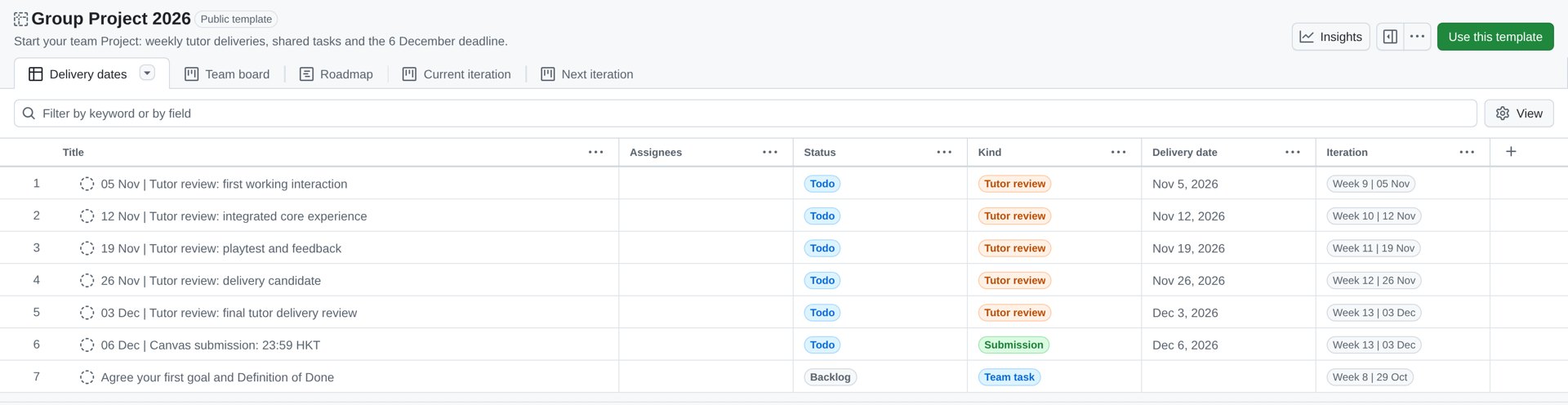
Start here ↓

→ Owner: sd5913 → Name your group's Project
SD5913 / WEEK 08 / 29 OCTOBER 2026
18
GITHUB / ISSUES → PROJECT → PULL REQUEST
Set up your team tracking.
1 / Open Group Project 2026 → Use this template → sd5913.
2 / Set up the name, repository link and teammate Project Write access.
3 / Plan issues in weekly iterations; use the dated tutor review cards.
4 / Track Status; link the PR, tests and review evidence.
A PR description with Closes #12 closes issue #12 on merge to the default branch.
SD5913 / WEEK 08 / 29 OCTOBER 2026
19
GROUP PROJECT / WEEKLY TUTOR REVIEWS
Bring a usable delivery each week.
Your assigned tutor / your scheduled tutorial slot that week
05 Nov
First working interaction
12 Nov
Integrated core experience
19 Nov
Playtest and feedback
26 Nov
Delivery candidate
03 Dec
Final tutor delivery review
Canvas deadline: 06 Dec 2026 / 23:59 HKT
SD5913 / WEEK 08 / 29 OCTOBER 2026
20
GROUP PROJECT / EXECUTION / 25%
Show how your team makes progress.
Plan: ordered tasks, clear owners and a goal for the next cycle.
Build: small, steady contributions and usable Increments.
Review: show what works; record tests, feedback and blockers.
Adapt: document weekly progress and the next improvement.
Link your board and progress notes from the README. Teamwork guide →
SD5913 / WEEK 08 / 29 OCTOBER 2026
21
APPLY THE CONCEPTS
Does this count as an Increment?
Team A: ten closed issues, but the project does not run.
Team B: one playable interaction, integrated and verified against the Definition of Done.
Which team can demonstrate a usable Increment?
Where do they inspect the product? Where do they improve teamwork?
SD5913 / WEEK 08 / 29 OCTOBER 2026
22
TEAMWORK / SAME CHANGE / STEP 1 OF 3
1. Alice starts a change
1
ALICE / LOCAL
Pull main; branch
Edit, test, commit
→
2
ALICE / LOCAL
Push to GitHub
git push
→
3
ALICE / GITHUB
Open the PR
Request a review
SD5913 / WEEK 08 / 29 OCTOBER 2026
23
TEAMWORK / SAME CHANGE / STEP 2 OF 3
2. Bob reviews the PR
1
BOB / REVIEW
Read the PR
Run and test it
→
2
BOB / GITHUB
Request a change
Explain the problem
→
3
ALICE / LOCAL
Fix and test
Commit and push
SD5913 / WEEK 08 / 29 OCTOBER 2026
24
TEAMWORK / SAME CHANGE / STEP 3 OF 3
3. Both update main
1
BOB / GITHUB
Check the fix
Approve the PR
→
2
ALICE / GITHUB
Merge the PR
Integrate into main
→
3
BOTH / LOCAL
Switch to main
Pull the update
SD5913 / WEEK 08 / 29 OCTOBER 2026
25
TEAMWORK / SHARED REPOSITORY
From change to shared main
1 / Branch
Update main
New branch
→
2 / Change
Edit and test
Commit; push
→
3 / Review
Open a PR
Teammate tests
→
4 / Merge
Merge on GitHub
Everyone pulls
A local commit becomes shared when you push. Teammates update when they pull.
SD5913 / WEEK 08 / 29 OCTOBER 2026
26
TEAMWORK / LOCAL TERMINAL
A small change, step by step
git switch main
git pull origin main
git switch -c feature/start-button
# edit and run the project checks
git add .
git commit -m "Add start button"
git push -u origin feature/start-button
Then open a pull request on GitHub.
SD5913 / WEEK 08 / 29 OCTOBER 2026
27
TEAMWORK / PULL REQUEST
Make it easy to review.
What changed? “Start button opens the first game screen.”
How can a teammate run it and try the change?
What did you test? What is still untested?
Reviewer checks the diff and tries the interaction before merge.
SD5913 / WEEK 08 / 29 OCTOBER 2026
28
TEAMWORK / CONFLICT
Two people changed the same line.
Git marks both versions
Agree on the result
<<<<<<< HEAD
label = "Play"
=======
label = "Start"
>>>>>>> feature/start-button
→
label = "Play"
Remove the markers.
Run it; commit the resolution.
Resolve the intention together; then test the interaction.
SD5913 / WEEK 08 / 29 OCTOBER 2026
29
TEAMWORK / REPOSITORY ACCESS
Choose how the team collaborates.
1 / Shared repository
ONE TEAM REPOSITORY / teammates have write access
Feature branch
→
Pull request
→
Team main
2 / Fork + pull request
Contributor’s fork
Their own copy + branch
PULL REQUEST
→
Team repository
Review + merge to main
Git reference / Both paths need review.
SD5913 / WEEK 08 / 29 OCTOBER 2026
30
03
Build in the cloud
A coding environment is a prepared workspace.
SD5913 / WEEK 08 / 29 OCTOBER 2026
31
ENVIRONMENTS / THREE DISTINCT PLACES
Where does the work happen?
Codex cloud
Develop a change
Tools + repository
→
GitHub Actions
Run a fresh job
Tests + build
→
Destination
Deliver the result
Artifact or website
Prepare a workspace → build a change → deliver and try the result.
SD5913 / WEEK 08 / 29 OCTOBER 2026
32
CODEX / DEMONSTRATION
Create a cloud environment.
1 / Connect GitHub and choose the repository.
2 / Prepare an environment; review setup and dependencies.
3 / Publish the environment, then start a task with it.
4 / Verify one change: review the diff and check the result.
SD5913 / WEEK 08 / 29 OCTOBER 2026
33
THREE STARTERS / CHOOSE YOUR PROJECT
Choose a starting point.
Capacitor
Web interface
Web + Android
Godot
2D game
Desktop + web
Python + uv
Python app
Source + desktop bundles
Use this template → Owner: sd5913 → open in Codex → check CI.
SD5913 / WEEK 08 / 29 OCTOBER 2026
34
CODEX / A USEFUL TASK
Ask for one verifiable change.
“Make the player move faster after collecting a star.”
Name the file or behaviour and the expected result.
Ask for the relevant checks and how to run the result.
Inspect the diff, run it, request a teammate review.
SD5913 / WEEK 08 / 29 OCTOBER 2026
35
BREAK / 10 MINUTES
Take a break.
Back in 10 minutes.
SD5913 / WEEK 08 / 29 OCTOBER 2026
36
04
From commit to delivery
GitHub Actions runs the workflow for your team.
SD5913 / WEEK 08 / 29 OCTOBER 2026
37
GITHUB ACTIONS / CHANGE TO OUTPUT
Follow the result
Push / PR
Workflow starts
Fresh runner
→
Checks
Install and test
Build on each OS
→
Artifact
Download and run
Or deploy website
Open the run → inspect the jobs → download or visit the result.
SD5913 / WEEK 08 / 29 OCTOBER 2026
38
CASE STUDY / TETRILAUNCH
One project, several delivery paths.
Desktop workflow: Windows, macOS and Linux matrix.
Android and iOS: mobile builds and signing.
Production deployment: Cloudflare Worker.
Build artifacts first. Stores and release signing are additional steps.
SD5913 / WEEK 08 / 29 OCTOBER 2026
39
GITHUB / SECRETS
Give a job access to a token.
1 / Create a scoped provider token for the destination.
2 / Open repository Settings → Secrets and variables → Actions.
3 / Add a New repository secret: CLOUDFLARE_API_TOKEN.
4 / Reference it in the workflow; keep the value out of Git.
SD5913 / WEEK 08 / 29 OCTOBER 2026
40
GITHUB ACTIONS / DEPLOYMENT EXAMPLE
A secret is supplied to the job
jobs:
  deploy:
    environment: production
    runs-on: ubuntu-latest
    steps:
      # checkout, install and build first
      - run: npx wrangler deploy
        env:
          CLOUDFLARE_API_TOKEN: ${{ secrets.CLOUDFLARE_API_TOKEN }}
Configure the destination and token separately.
SD5913 / WEEK 08 / 29 OCTOBER 2026
41
DELIVERY / TROUBLESHOOT
The build is green. Is it delivered?
Open the Actions run: which job ran, and which artifact exists?
Download and run the artifact, or open the deployed destination.
Environment-scoped secret missing? Check the job names that environment.
Provider tokens need access to the correct destination.
SD5913 / WEEK 08 / 29 OCTOBER 2026
42
05
Camera → interaction
OpenCV captures frames. MediaPipe finds structure.
SD5913 / WEEK 08 / 29 OCTOBER 2026
43
LIVE DEMO / PIPELINE
From light to an action
OpenCV
Camera → frame
BGR → RGB
→
MediaPipe
Model → landmarks
Coordinates + confidence
→
Your code
Map the result
Draw or change state
A model predicts structure. Your code decides what happens next.
SD5913 / WEEK 08 / 29 OCTOBER 2026
44
COMPUTER VISION / DATA
What is a camera frame?
A grid of colour values
One pixel: three channels
→
B
G
R
OpenCV: BGR
MediaPipe input: RGB
Video = frame → frame → frame over time
SD5913 / WEEK 08 / 29 OCTOBER 2026
45
PYTHON / WEEK 7 REVISITED
Classes, objects and methods
Class
Object
Method call
Ball
red
red.update(0.1)
VideoCapture
camera
camera.read()
HandLandmarker
tracker
tracker.detect_for_video(...)
Create an object once. Call its methods as the program runs.
SD5913 / WEEK 08 / 29 OCTOBER 2026
46
PYTHON / PFAD WEEK 8
Read a frame from the camera
camera = cv2.VideoCapture(camera_index)
ok, frame = camera.read()
if not ok:
    raise RuntimeError("Camera frame unavailable")
frame = cv2.flip(frame, 1)
rgb = cv2.cvtColor(frame, cv2.COLOR_BGR2RGB)
One method call returns a success flag and an image array.
SD5913 / WEEK 08 / 29 OCTOBER 2026
47
PYTHON / PFAD WEEK 8
Configure the tracker
base = mp.tasks.BaseOptions(model_asset_path=str(model_path))
options = mp.tasks.vision.HandLandmarkerOptions(
    base_options=base,
    running_mode=mp.tasks.vision.RunningMode.VIDEO,
    num_hands=1,
)
Options describe the task; the .task file contains the trained model.
SD5913 / WEEK 08 / 29 OCTOBER 2026
48
PYTHON / PFAD WEEK 8
Call a method for each frame
with HandLandmarker.create_from_options(options) as tracker:
    # Repeat for each RGB frame and increasing timestamp
    image = mp.Image(image_format=mp.ImageFormat.SRGB,
                     data=rgb)
    result = tracker.detect_for_video(image, timestamp_ms)
The method returns a result object; it does not choose a game action.
SD5913 / WEEK 08 / 29 OCTOBER 2026
49
LIVE / FACE + HAND
Look at what the model returns.
Face detector: a box around each detected face.
Hand Landmarker: 21 points per hand, including index fingertip 8.
Move closer, rotate your hand, hide it: when does tracking fail?
SD5913 / WEEK 08 / 29 OCTOBER 2026
50
PYTHON / FOLLOW THE RESULT
Find the index fingertip
result.hand_landmarks[0][8].x
hand_landmarks
List of detected hands
→
[0][8]
First hand → fingertip 8
→
.x
Horizontal position
0 / left edge
0.5 / centre
1 / right edge
SD5913 / WEEK 08 / 29 OCTOBER 2026
51
PYTHON / PFAD WEEK 8
What if no hand is found?
if result.hand_landmarks:
    x = result.hand_landmarks[0][8].x
else:
    x = None
selected = tile_for_x(x)
Check the list before indexing; None means no input.
SD5913 / WEEK 08 / 29 OCTOBER 2026
52
PYTHON / PFAD WEEK 8
Turn a position into a choice
def tile_for_x(x):
    if x is None or not isinstance(x, (int, float)):
        return None
    if not math.isfinite(x) or not 0 <= x <= 1:
        return None
    return "blue" if x < 0.5 else "red"
Predict: 0.49 → ? 0.50 → ? None → ?
SD5913 / WEEK 08 / 29 OCTOBER 2026
53
LIVE / HAND TO RESPONSE
A coordinate becomes a choice.
Index fingertip / landmark 8 / horizontal position x
Blue
Red
x < 0.5
x ≥ 0.5
No hand → None → neither tile is selected.
SD5913 / WEEK 08 / 29 OCTOBER 2026
54
PYTHON / PFAD WEEK 8
Draw a point on the frame
height, width = frame.shape[:2]
for point in points:
    pixel = (int(point.x * width),
             int(point.y * height))
    cv2.circle(frame, pixel, 2, colour, -1)
Normalised coordinates × image size → pixel coordinates.
SD5913 / WEEK 08 / 29 OCTOBER 2026
55
LIVE / GESTURE + POSE
Compare two kinds of output.
Gesture Recognizer: a trained model returns a gesture label and score.
Pose Landmarker: body points can drive an interaction.
A score is model confidence, not proof of intent.
SD5913 / WEEK 08 / 29 OCTOBER 2026
56
LIVE / SEGMENTATION
A mask changes the background.
The model estimates a person mask for each frame.
OpenCV combines foreground with a replacement background.
Try hair, a raised hand and a busy background.
SD5913 / WEEK 08 / 29 OCTOBER 2026
57
TUTORIAL / TWO HOURS
Try all nine vision examples.
Camera → face / hand / pose → mesh / gesture
Combine models. Try segmentation. Question expression labels.
Could this inspire your project?
Computer vision is optional. Try hand tracking in a browser →
SD5913 / WEEK 08 / 29 OCTOBER 2026
58
Build together.
Show your work.
One idea. One shared repository. A working next step.
SD5913 / WEEK 08 / 29 OCTOBER 2026
a·t4x
SD5913 / WEEK 08 / 29 OCTOBER 2026
Teamwork, cloud environments, delivery and computer vision.
OPENING / YOUR GROUP PROJECT
A A game
B An app or creative tool
C An installation
D Something else / still deciding
ClassPoint · multiple choice — answer on the projector
SD5913 / WEEK 08 / 29 OCTOBER 2026
01 Project, assessment and news
02 Agile, Scrum and GitHub tracking
03 Git workflow + Codex environments
04 10-minute break
05 Actions, builds and deployment secrets
06 Live camera: OpenCV + MediaPipe
07 PFAD: the two-hour tutorial
NEWS / 28 OCTOBER
NEWS / 28 OCTOBER / VOICE
01
AN AMBITIOUS IDEA, BUILT AND DELIVERED TOGETHER.
GROUP PROJECT / CANVAS
GROUP PROJECT / 40% OF COURSE GRADE
PROJECT / FIRST AGREEMENT
02
PLAN TOGETHER. BUILD, REVIEW AND ADAPT.
AGILE / SCRUM / TOOLS
AGILE / WEEK 1 REVISITED / 2001
AGILE / ITERATIVE + INCREMENTAL
SCRUM / THREE ACCOUNTABILITIES
SCRUM / ARTIFACTS + COMMITMENTS
SCRUM / THE SPRINT + FOUR EVENTS
GITHUB PROJECTS / ILLUSTRATIVE BOARD
GITHUB PROJECTS / PUBLIC COURSE TEMPLATE
GITHUB / ISSUES → PROJECT → PULL REQUEST
GROUP PROJECT / WEEKLY TUTOR REVIEWS
GROUP PROJECT / EXECUTION / 25%
APPLY THE CONCEPTS
TEAMWORK / SAME CHANGE / STEP 1 OF 3
TEAMWORK / SAME CHANGE / STEP 2 OF 3
TEAMWORK / SAME CHANGE / STEP 3 OF 3
TEAMWORK / SHARED REPOSITORY
TEAMWORK / LOCAL TERMINAL
git switch main git pull origin main git switch -c feature/start-button # edit and run the project checks git add . git commit -m "Add start button" git push -u origin feature/start-button
Then open a pull request on GitHub.
TEAMWORK / PULL REQUEST
TEAMWORK / CONFLICT
<<<<<<< HEAD
label = "Play"
=======
label = "Start"
>>>>>>> feature/start-button
label = "Play"
TEAMWORK / REPOSITORY ACCESS
Git reference / Both paths need review.
03
A CODING ENVIRONMENT IS A PREPARED WORKSPACE.
ENVIRONMENTS / THREE DISTINCT PLACES
CODEX / DEMONSTRATION
THREE STARTERS / CHOOSE YOUR PROJECT
CODEX / A USEFUL TASK
BREAK / 10 MINUTES
04
GITHUB ACTIONS RUNS THE WORKFLOW FOR YOUR TEAM.
GITHUB ACTIONS / CHANGE TO OUTPUT
CASE STUDY / TETRILAUNCH
GITHUB / SECRETS
GITHUB ACTIONS / DEPLOYMENT EXAMPLE
jobs:
deploy:
environment: production
runs-on: ubuntu-latest
steps:
# checkout, install and build first
- run: npx wrangler deploy
env:
CLOUDFLARE_API_TOKEN: ${{ secrets.CLOUDFLARE_API_TOKEN }}
Configure the destination and token separately.
DELIVERY / TROUBLESHOOT
05
OPENCV CAPTURES FRAMES. MEDIAPIPE FINDS STRUCTURE.
LIVE DEMO / PIPELINE
COMPUTER VISION / DATA
PYTHON / WEEK 7 REVISITED
PYTHON / PFAD WEEK 8
camera = cv2.VideoCapture(camera_index) ok, frame = camera.read() if not ok: raise RuntimeError("Camera frame unavailable") frame = cv2.flip(frame, 1) rgb = cv2.cvtColor(frame, cv2.COLOR_BGR2RGB)
PYTHON / PFAD WEEK 8
base = mp.tasks.BaseOptions(model_asset_path=str(model_path)) options = mp.tasks.vision.HandLandmarkerOptions( base_options=base, running_mode=mp.tasks.vision.RunningMode.VIDEO, num_hands=1, )
PYTHON / PFAD WEEK 8
with HandLandmarker.create_from_options(options) as tracker: # Repeat for each RGB frame and increasing timestamp image = mp.Image(image_format=mp.ImageFormat.SRGB, data=rgb) result = tracker.detect_for_video(image, timestamp_ms)
LIVE / FACE + HAND
PYTHON / FOLLOW THE RESULT
PYTHON / PFAD WEEK 8
if result.hand_landmarks: x = result.hand_landmarks[0][8].x else: x = None selected = tile_for_x(x)
PYTHON / PFAD WEEK 8
def tile_for_x(x): if x is None or not isinstance(x, (int, float)): return None if not math.isfinite(x) or not 0 <= x <= 1: return None return "blue" if x < 0.5 else "red"
LIVE / HAND TO RESPONSE
PYTHON / PFAD WEEK 8
height, width = frame.shape[:2] for point in points: pixel = (int(point.x * width), int(point.y * height)) cv2.circle(frame, pixel, 2, colour, -1)
LIVE / GESTURE + POSE
LIVE / SEGMENTATION
TUTORIAL / TWO HOURS
One idea. One shared repository. A working next step.
SD5913 / WEEK 08 / 29 OCTOBER 2026